How to Redeem Roll Army to Fight Codes
Exact Shop path so every working code turns into Cash and luck potions on the first try.
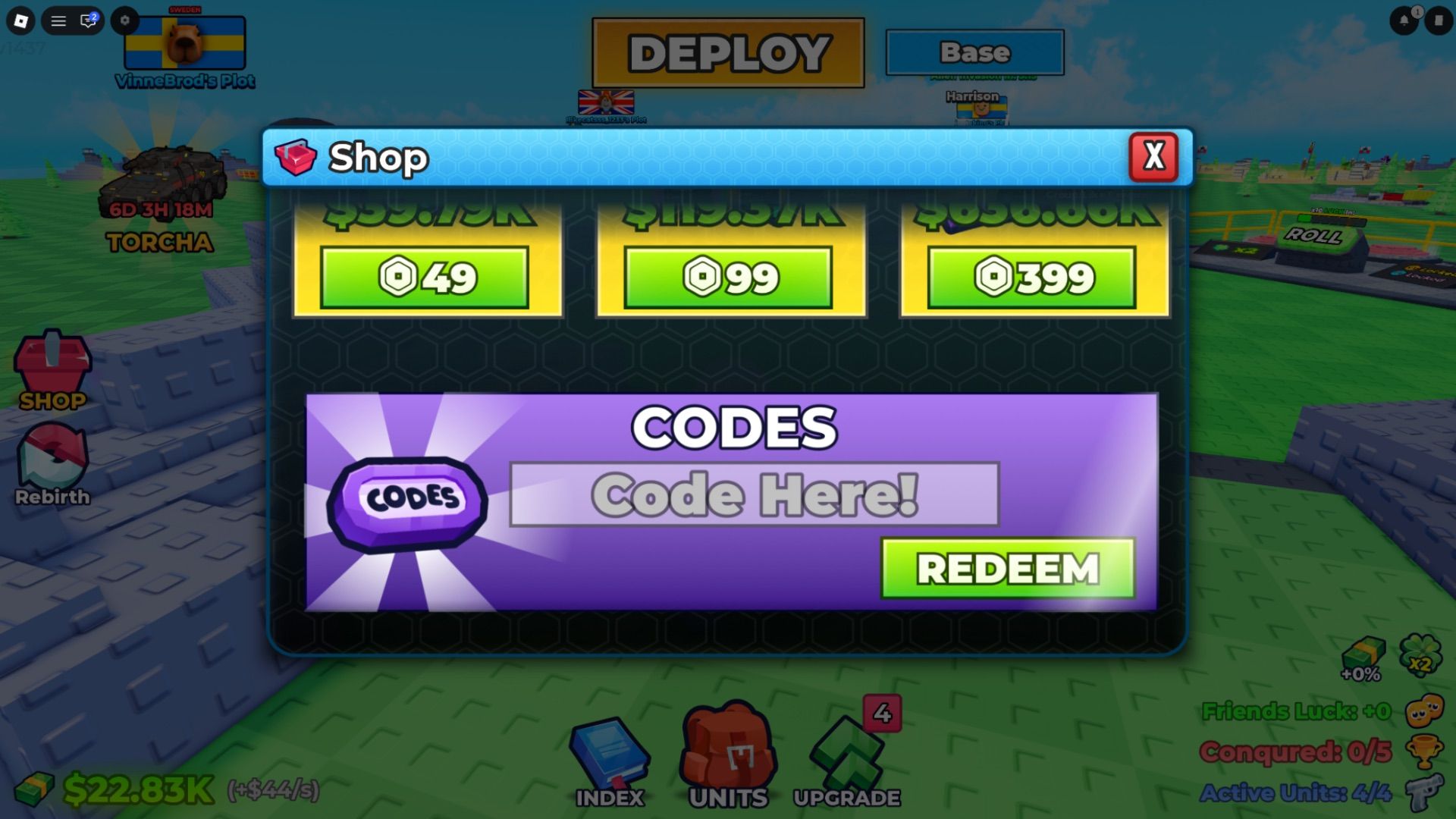
Redeem codes in under a minute
Working codes only help if you can paste them without typos. This guide walks through the Shop path used in Roll Army to Fight so you claim RELEASE and INVASION before the luck timers start ticking down. The same Shop → codes box → paste → claim flow matches the steps highlighted in the 22 November 2026 GameRant codes roundup that still lists both strings as live.
Step-by-step (Shop → codes box)
- Join the experience from the official Roblox page for Roll Army to Fight and wait until your plot fully loads.
- Finish the short tutorial if this is a brand-new account — the Shop tools sometimes stay locked until the intro ends.
- Open the Shop from the main HUD (usually a shop / store button on the side of the screen).
- Locate the Codes box inside the Shop panel. It is a text field labelled for codes or redeem — the same box GameRant and in-game UI point players toward.
- Paste one code exactly as listed on the Codes Hub (
RELEASEorINVASION). Prefer copy-paste over typing. - Press Claim / Redeem and watch for a success toast. Cash totals and potion counts should update immediately.
- Repeat for every remaining working code, then close the Shop and start rolling.
If the UI rejects a string with “invalid” or “expired,” remove it from your personal list and re-check the hub later the same day. As of the Nov 22 confirmation there is still no expired list — failures are usually typos or a half-loaded Shop.
Preparing before you paste
A clean redeem session looks like this:
- Stable connection so the Shop does not desync mid-claim.
- Inventory space awareness — potions need a place to land.
- A plan for the next five minutes: buy luck upgrades, then roll while potions are active.
Do not redeem INVASION and then walk away from the keyboard. Those 2x and 4x potions only last three minutes each. Pair redeeming with the upgrade luck checklist so permanent luck is already purchased.
What success looks like
After a good claim you should see:
- Higher Cash balance for buying the unit currently on the podium.
- New or refreshed luck potion timers (2x and/or 4x).
- No error banner in the Shop.
Then leave the Shop, confirm units are still earning, and start a roll burst. Use the Getting Started loop if you are unsure what to buy first.
Troubleshooting failed codes
| Symptom | Likely cause | Fix |
|---|---|---|
| “Code does not exist” | Typo or expired string | Re-copy from Codes Hub |
| No codes box | Tutorial incomplete / UI not loaded | Rejoin, finish tutorial, reopen Shop |
| Claim does nothing | Lag or double-click desync | Wait 5 seconds, reopen Shop, try once |
| Potions missing | Wrong inventory tab | Check potion / boost tray |
Still stuck? Join the official Discord (discord.com/invite/tgrhZqkekt) and compare notes with other players after an update. Sometimes the Shop moves during a UI refresh — the Updates Hub will note major layout changes when we confirm them.
Best order to redeem and spend
- Redeem all working codes listed on the Codes Hub.
- Buy the next permanent luck upgrade you can afford.
- Activate potions only when you are ready to roll for 3+ uninterrupted minutes.
- Replace weak units using the tier list and best units notes.
- Send the upgraded army to conquer using conquer areas.
This order turns free Cash into lasting power instead of a temporary spike that evaporates when the potion ends.
Mobile vs desktop
On mobile, tap carefully — the codes field can lose focus if you switch apps mid-paste. Keep the code list open in a second tab or note app. On desktop, keep this wiki beside Roblox so you can paste without retyping. Either way, never share your Roblox password or account cookie when someone offers to “redeem for you.”
Aftercare: make the rewards stick
Codes are a multiplier on good habits, not a replacement for them. After redeeming:
- Keep high-DPS units placed so Cash keeps ticking — see offline earnings.
- Avoid selling rare pulls for pocket change.
- Check PvP tips once your army can contest other players.
- Revisit the Codes Hub after every patch day.
Master the redeem path once and every future drop becomes free progress in seconds.
Frequently Asked Questions
Quick answers to the most common questions.
Where is the codes box in Roll Army to Fight?
Inside the Shop panel. Open Shop from the HUD, then look for the redeem / codes text field.
Why did my code fail?
Most failures are typos, expired strings, or redeeming before the Shop finished loading. Re-copy from the Codes Hub and try once more.
Can I redeem the same code twice?
No. Each code is typically one claim per account. After success, move on to the next working string.
Should I redeem on mobile?
Yes, as long as you paste carefully and stay in-game until the claim toast appears.